





Can a Mini Gaming PC Replace the Steam Machine? EU Price, Specs & Performance
Can a Mini Gaming PC Replace the Steam Machine?
You want something under the television that you can play from the sofa. Whether a mini gaming PC can take that place depends on which Mini PC you buy.
A small model with integrated graphics is a comfortable fit for indie games, esports and light 1080p. It does not hold the same resolution and the same presets once the other machine has a dedicated graphics card.
Under the TV, the chip is only part of the choice. You still need to know how much setup the PC asks for, whether a controller is enough day to day, what sleep and resume actually do, and whether the price is a PC that is ready to play or a barebone that still needs memory and an SSD.
If you are still sorting out what that small PC includes, the ACEMAGIC mini PC guide sets out the basic parts. The rest of this page stays on the European price, the hardware, and where a dedicated graphics card changes the result.
Steam Machine Price in Europe: What Do You Get for €1,039?
In Europe, the 512 GB Steam Machine starts at €1,039, including VAT where applicable. VideoCardz lists four public prices: €1,039 for the 512 GB model, €1,108 for the 512 GB model with a Steam Controller, €1,359 for the 2 TB model, and €1,428 for the 2 TB model with the controller.
For the 512 GB model, that money includes a Zen 4 CPU with 6 cores and 12 threads, an RDNA 3 GPU with 28 compute units, 8 GB of GDDR6 on the graphics chip, 16 GB of DDR5 for the system, a 512 GB SSD and SteamOS. The full table is in the specs section. The source gives 2026 as the release year and does not give a calendar day. Memory and SSD costs are a separate question from that shelf price, which is why the note on why SSD and RAM prices have been rising is worth reading before you treat that shelf price as the whole story.
Source: VideoCardz, European public prices, including VAT where applicable. videocardz.com. Checked 30 September 2026.
Steam Machine Specs: What Kind of Gaming Performance Should You Expect?
These are the Steam Machine specs that matter for the 512 GB model. They describe the hardware. They are not a frame-rate table, and this guide does not invent Steam Machine results that the source does not publish.
| Item | Steam Machine (512 GB) |
|---|---|
| CPU | Zen 4, 6 cores / 12 threads |
| GPU | RDNA 3, 28 CUs |
| VRAM | 8 GB GDDR6 |
| RAM | 16 GB DDR5 |
| SSD | 512 GB |
| OS | SteamOS |
| European price | €1,039, including VAT where applicable |
| Release | 2026 |
1080p is the comfortable range. At 1440p the result depends on the game and the settings. At 4K on High, 8 GB and 28 CUs run out. Getting a 4K picture is not the same as holding 4K at 60 FPS on High.
VRAM and system RAM are not the same number. The 8 GB of GDDR6 belongs to the GPU. The 16 GB of DDR5 stays with the system. On integrated graphics that line disappears, because the GPU shares the RAM. The guide to how much VRAM you need is why the table keeps the two rows apart.
Steam Machine vs Mini Gaming PC: What Actually Changes?
A mini gaming PC is a small PC built to play games. It does not become a Steam Machine because it fits on a shelf. A dedicated graphics card is what makes the same resolution and the same presets realistic.
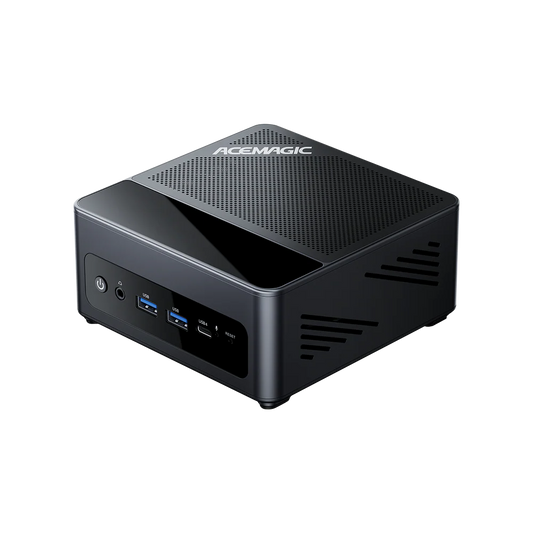
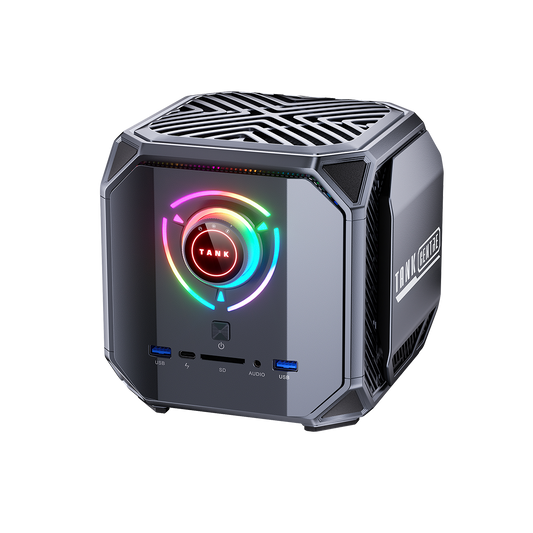
The ACEMAGIC M1A Pro is a complete mini gaming PC, not only a kit, and an independent test measured the GeForce RTX 5060 configuration. Its Core i9-13900HK is a mobile HK chip, which is a different class from a higher-power HX part. That split is what the note on Intel HK versus HX is about. The table below stays on the 512 GB Steam Machine.
| Item | Valve Steam Machine (512 GB) | ACEMAGIC M1A Pro with RTX 5060 |
|---|---|---|
| Price | €1,039, including VAT where applicable | €1,499 on acemagic.eu for 32 GB and 1 TB |
| CPU | Zen 4, 6 cores / 12 threads | Intel Core i9-13900HK, 14 cores / 20 threads |
| GPU | RDNA 3, 28 CUs | GeForce RTX 5060 |
| VRAM | 8 GB GDDR6 | Dedicated graphics card |
| RAM | 16 GB DDR5 | 32 GB DDR5, dual channel |
| Storage | 512 GB | 1 TB NVMe SSD |
| OS | SteamOS | Windows 11 Pro |
| Upgrades | Closer to a closed device | 2 SO-DIMM slots; 2 M.2 slots |
| Size and the TV | A finished living-room product | Mini PC: HDMI 2.0, DisplayPort 2.0 and USB4 |
| From the sofa | Designed in from the start | Depends on the OS, the controller and the setup |
The cheaper Steam Machine is a finished living-room product at the European price above. The M1A Pro costs more, at €1,499, because of the dedicated card, 32 GB of RAM and the 1 TB SSD. That shop price is the figure shown for the complete configuration. It is not a currency conversion.
Upgrades are the other change. A mini gaming PC in this class can take more memory and a second SSD later. Under the TV, that still does not copy the Steam Machine setup on its own. Sleep, the controller and the television path have to be checked, which is what the later sections are for.
Why an iGPU Mini PC Can Be Great Without Being an Equal Replacement
A cheap Mini PC with integrated graphics can be the right buy. Indie games, esports and light 1080p are the jobs it is built for. It is a different product from the Steam Machine when the resolution and the preset stay the same, because the Steam Machine has a fixed GPU with its own 8 GB of VRAM, not a chip sharing system memory.
A Radeon 780M or 890M can cover that lighter list. A small case does not turn it into a substitute for dedicated graphics. If you want to see what integrated AMD graphics actually do in games, the Radeon 890M benchmarks are the practical read, not a second spec table for the Steam Machine.
Mini PC With Dedicated Graphics: Real 1080p, 1440p and 4K Gaming
Can a Mini PC with a dedicated graphics card hold current games at 1080p, 1440p and 4K? The useful test is one PC, the same games, and more than one resolution, under one graphics setup.
The test system is an ACEMAGIC M1A Pro: Intel Core i9-13900HK (14 cores / 20 threads), GeForce RTX 5060, 32 GB DDR5 in dual channel, a 1 TB NVMe SSD and Windows 11 Pro. Video out is HDMI 2.0 at 4K 60 Hz, DisplayPort 2.0 and USB4. The board has 2 SO-DIMM slots and 2 M.2 slots. In Take2Play's independent test, the games below were run at the High preset, with DLSS Quality on, ray tracing off and frame generation off. These are a third party's results, not an ACEMAGIC lab.
| Game | 1080p | 1440p / 2K | 4K |
|---|---|---|---|
| Cyberpunk 2077 | 115 FPS | 92 FPS | 47 FPS |
| Red Dead Redemption 2 | 126 FPS | 96 FPS | 57 FPS |
| Forza Horizon 5 | 143 FPS | 125 FPS | 73 FPS |
| Resident Evil Requiem | 125 FPS | 95 FPS | 46 FPS |
| Black Myth: Wukong | 85 FPS | 64 FPS | 38 FPS |
| Crimson Desert | 83 FPS | 60 FPS | 37 FPS |
| Pragmata | 110 FPS | 80 FPS | 37 FPS |
Benchmark source: Take2Play. ACEMAGIC M1A Pro RTX 5060 test. High preset, DLSS Quality on, ray tracing off, frame generation off.
1080p: plenty of headroom
Every game in this sample cleared 60 FPS at 1080p, and several stayed above 100 FPS. The practical question is whether the living-room TV is 1080p, or whether you would rather have a high refresh rate before more pixels. On this Mini PC, 1080p is not the fallback. It is the setting with the most headroom.
1440p: the middle of the table
The 1440p results carry more weight. Cyberpunk 2077 reached 92 FPS, Red Dead Redemption 2 reached 96 FPS, Forza Horizon 5 reached 125 FPS and Black Myth: Wukong reached 64 FPS. The whole sample stayed at 60 FPS or above. For a television in the living room right now, that is a more realistic target than native 4K in every game.
4K: the limits show
At 4K the limits show. Forza Horizon 5 still reached 73 FPS, while several titles stayed in the 30s, between 37 and 47 FPS. Getting a 4K picture and holding 4K at 60 FPS on High in every new game are two different things. At 4K, upscaling or a lower preset is part of the setup. Frame generation was off in this test.

The M1A Pro stands out for its stronger gaming performance and flexibility. It offers more headroom for demanding games while keeping the freedom of a full Windows PC.
See the ACEMAGIC M1A Pro with RTX 5060Barebone vs Complete Mini PC: What Does It Really Cost in Europe?
European buyers compare VAT-inclusive retail prices. The barebone price is not the ready-to-play cost. You still add DDR5 RAM, an NVMe SSD, a Windows licence if you need one, and a controller if you do not already own one. A complete Mini PC already includes the RAM, the SSD and Windows.
| Line | What you are paying for |
|---|---|
| Barebone price | The PC without RAM and SSD. On acemagic.eu, the M1A Pro barebone is listed at €999. |
| DDR5 RAM | Bought at local VAT-inclusive retail. This guide does not invent a euro price for the modules. |
| NVMe SSD | Bought at local VAT-inclusive retail. This guide does not invent a euro price for the drive. |
| Windows licence, if required | Bought at local VAT-inclusive retail if the barebone does not include Windows. |
| Controller | Bought at local VAT-inclusive retail if you do not already have one. |
| Ready to play | Those lines added together. A lower barebone price is not that total. |
| Complete Mini PC | RAM, SSD and Windows are already included. The M1A Pro with 32 GB and 1 TB is listed at €1,499. |
Put the comparison on a usable setup, such as 32 GB of memory and 1 TB NVMe, then add the operating system and any controller you do not already own. A barebone can still be a fair deal if you already have compatible SO-DIMMs or an SSD. If you are fitting those parts yourself, the barebone Mini PC build guide is the practical next read. Do not treat the barebone line as the cost of a PC that is ready to play.
Bazzite, SteamOS or Windows?
The operating system changes how the PC feels from the sofa more than a small gap between CPUs. On the ACEMAGIC M1A Pro with a GeForce RTX 5060, Windows is the simpler path. On an AMD Mini PC, Bazzite is the cleaner Steam-first start. SteamOS stays Valve's own system on the Steam Machine. It is not the install you get by buying a Windows Mini PC.
| Priority | Where it is simpler |
|---|---|
| RTX 5060 in the M1A Pro | Windows 11. Steam can start in Big Picture. |
| AMD graphics, Steam-first | Bazzite, as a cleaner start than NVIDIA for that interface. |
| Steam Machine | SteamOS, as shipped. Not a second system you add later. |
| Game libraries and desktop software | Windows has the wider set. Bazzite is there for a Steam-centred session. |
That AMD path is a different PC, not a peer of the RTX 5060 results above. As a reference for an AMD Mini PC with Radeon graphics, there is the Ryzen 5 7640HS and Radeon 760M test on the AM18. Use it to see how an integrated Radeon system behaves, not as a stand-in for the dedicated-graphics table.
Does a Mini PC Actually Work Well in the Living Room?
Under the TV, raw power is not enough on its own. From the sofa, you wake the PC and turn on the TV. If that path is awkward, the chip does not matter yet.
A compact gaming PC still has to reach the television. On the M1A Pro, HDMI 2.0 is 4K at 60 Hz, not 4K at 120 Hz. DisplayPort 2.0 and USB4 are the other outputs. HDR and VRR are not settled by the port name alone. The HDMI 2.0 and HDMI 2.1 guide is the check for what the cable and the TV input can actually do.
A gaming PC connected to a TV needs a controller for ordinary play, sleep and resume reliable enough that you stop noticing, and noise that does not talk over the game once the PC is in a cabinet.
Storage is the other half of console-like PC gaming: a second drive matters more after a few large installs than it does on the spec sheet. A small PC for the living room still needs a stable network. Wi-Fi can be enough, and Ethernet is the simpler fix when it is not.
| Check before you buy | Why it matters in the living room |
|---|---|
| Path to the TV | HDMI 2.0 on this Mini PC is 4K at 60 Hz. Confirm the input and the cable before you expect a higher mode. |
| HDR and VRR | They are not automatic. The TV input and the cable have to agree with the PC. |
| Controller | Starting a game from the sofa should not need a keyboard and mouse every time. |
| Sleep and resume | It has to keep working from the sofa, so you are not hunting for a keyboard. |
| Noise | A small case is not a quiet case at full load. |
| Storage and network | Leave room for games, and use Ethernet if Wi-Fi in that corner is weak. |
Which Type of Mini PC Makes Sense for You?
If you want SteamOS and you do not want to build anything, the finished Steam Machine is the direct path. The 512 GB model is the €1,039 configuration covered above, with the controller and the 2 TB options listed beside it.
If your games stay light, an iGPU Mini PC is the matching buy: indie games, esports and light 1080p, not the same presets at a higher resolution. If you want 1440p headroom and room to add memory and storage later, a dedicated-graphics mini gaming PC in the M1A Pro class is the closer fit. Choosing the chip is a separate step from choosing the case, which is what the guide to AMD, Intel and NVIDIA in a Mini PC is for.
Frequently asked questions
Does a Mini PC wake the TV over HDMI-CEC the way the Steam Machine does?
The Steam Machine is built around HDMI-CEC. A Mini PC does not automatically wake the TV. Check the board and the operating system before you count on one button from the sofa. The ACEMAGIC M1A Pro product page does not list HDMI-CEC, so do not assume it is there.
Do HDR and VRR work automatically because the Mini PC has HDMI 2.0?
No. HDR and VRR are not automatic just because HDMI 2.0 is present. HDMI 2.0 on this Mini PC is 4K at 60 Hz, not 4K at 120 Hz. Check the TV input and the cable for the mode you actually want.
Can a controller wake the Mini PC from sleep?
It depends on the operating system, on Bluetooth or the 2.4 GHz dongle, and on the board. Test controller wake before the PC goes in the cabinet.
Can Windows and Bazzite share one Mini PC?
Windows and Bazzite can share a PC, but it is extra setup, not how the Steam Machine ships. The Steam Machine stays on SteamOS. This is not a dual-boot tutorial.
Is Wi-Fi enough for a Mini PC in the living room?
A living-room PC still needs a stable network. The ACEMAGIC M1A Pro page lists Wi-Fi 7. Ethernet is the simpler fix when Wi-Fi is weak.